
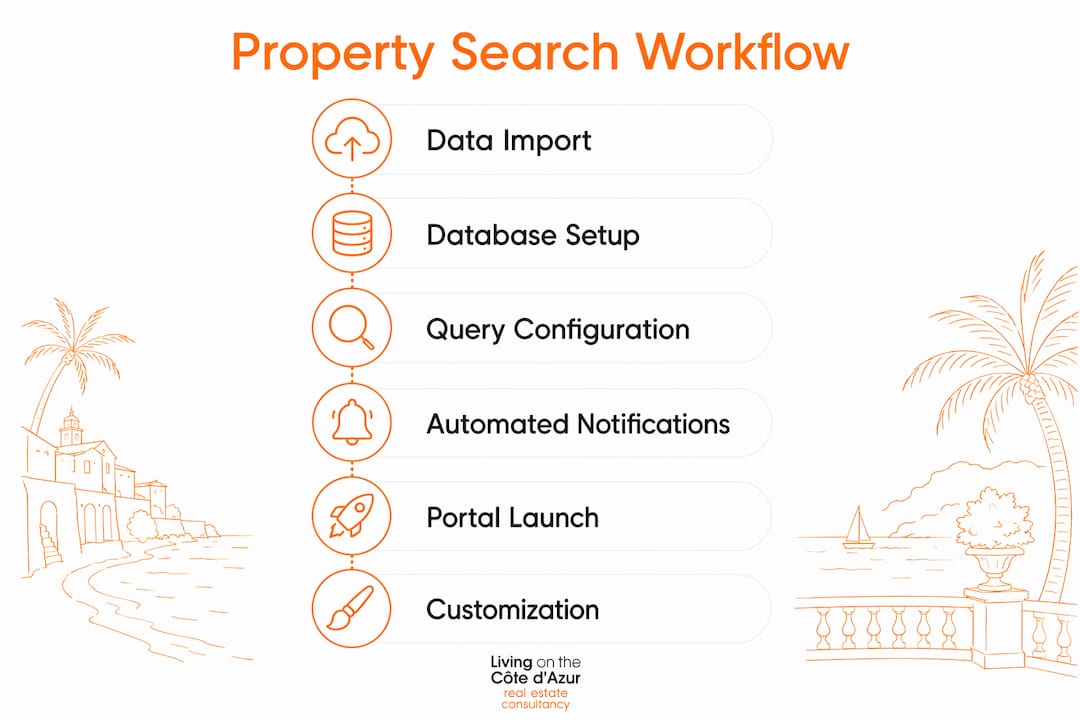
An automated property search workflow is a structured, multi-stage system that filters, screens, and presents real estate options efficiently, integrating data management, communication automation, and user access controls to keep acquisitions moving around the clock. For conveyancing practices and real estate professionals in the UK, the difference between a chaotic search and a curated one comes down to architecture: how data enters the system, how queries are built, and how clients receive results without anyone manually chasing listings at midnight.
The core components of a well-built workflow are:
- Data import layer: ingesting listings from local agency databases, MLS feeds, public portals, and off-market sources into a centralised repository
- SQL database: storing and structuring property records with consistent schema design for fast, repeatable querying
- Query builder: dynamic filters reflecting must-have criteria, deal-breakers, and evolving client preferences
- Automation engine (n8n): orchestrating triggers, scheduling, and task delegation between machine and human actors
- Gmail or SMTP integration: delivering personalised property reports and alerts to clients automatically
- User roles and access controls: restricting data visibility and workflow permissions by team member or client tier
The benefits are tangible. Structured workflows apply elimination gates at each stage, so professionals spend the most time on the fewest, best-qualified properties. Accuracy improves because filters are defined once and applied consistently. Scalability follows naturally from a well-designed schema: adding a new client or a new data source does not require rebuilding the system from scratch.
1. How to import and structure real estate data for your workflow
Every property search workflow lives or dies by the quality of its input data. Poorly formatted listings, inconsistent field names, or missing values corrupt queries before they run. Getting this step right is the foundation on which everything else rests.
Identify your data sources. In the UK, primary sources include Rightmove and Zoopla feeds (via API or data partnerships), local agency databases, Land Registry records, and off-market networks. Workflows that rely solely on public portals miss a meaningful portion of available inventory, particularly in high-value markets where private introductions carry significant weight. Integrating agent networks and private databases from the outset gives your search genuine completeness.
Define a consistent schema. Every record entering the database should carry the same fields: property ID, address, postcode, price, property type, bedrooms, bathrooms, floor area (sq ft or sq m), tenure (freehold or leasehold), listing date, source, and status. Enforce data types strictly. A price field that sometimes holds “£850,000” as a string and sometimes 850000 as an integer will break every price-range query you build.
Automate ingestion with scripts or API connectors. Use Python scripts, n8n HTTP request nodes, or dedicated ETL tools to pull listings on a schedule. For UK government data, the GOV.UK material information guidance sets out what fields agents must include in listings, giving you a reliable baseline for schema completeness.
Standardise location data. Postcodes are your most reliable geographic key in the UK. Store them in a dedicated field and validate them against the Royal Mail Postcode Address File or an open equivalent. This enables radius searches and geographic clustering later.
Apply preliminary filters at ingestion. Before a record enters the main database, run it through a basic gate: does it fall within the accepted price band? Is the property type on the approved list? Does the postcode sit within the target area? Records that fail these checks go to a rejected table for review, not into the live search pool. This keeps the active dataset clean and query times fast.
Pro Tip: Pre-screen data sources for completeness before connecting them. A feed that omits floor area or tenure for 40% of its records will silently degrade your filtering accuracy. Run a completeness audit on any new source before it goes live.

2. How to configure your database connection and query builder
With clean data in place, the next task is connecting your automation engine to the database and building queries that can flex as client requirements evolve. This is where n8n earns its place at the centre of the workflow.
Connect n8n to your SQL database. n8n supports PostgreSQL, MySQL, and SQLite natively via its database nodes. Create a dedicated read/write user for the workflow with the minimum permissions it needs: SELECT on the listings table, INSERT and UPDATE on the results and audit tables. Never connect with a superuser account.
Use parameterised queries exclusively. Hard-coded values in SQL strings are a security liability and a maintenance burden. Parameterised queries accept client criteria as variables, making them reusable across clients and safe against injection attacks. A single query template can serve dozens of client profiles by swapping the parameter values at runtime.
Build modular query components. Separate your WHERE clause conditions into logical blocks: location filters, price filters, property type filters, and feature filters. Assemble them dynamically based on which criteria a given client has set. This modularity means adding a new filter type (say, EPC rating for energy-efficient properties) requires adding one block, not rewriting the whole query.
Reflect must-haves and deal-breakers explicitly. Must-have criteria appear as AND conditions: the property must match all of them. Deal-breakers appear as NOT conditions: the property must match none of them. Keeping these logically separate in the query structure makes it easy to audit what the system is actually filtering and why a property was excluded.
Log every query execution. Write query timestamps, parameter values, and result counts to an audit table. This gives you a traceable record for compliance purposes and a diagnostic trail when results look unexpected.
Pro Tip: Design your query parameters to mirror the language your clients use. If a client says “no ground-floor flats,” that translates to a specific NOT condition. Mapping natural client language to query logic during onboarding prevents mismatches between what clients expect and what the system delivers.

3. How to set up automated email delivery and keep clients informed
A property search workflow that filters brilliantly but communicates poorly loses its value at the last step. Automated email delivery, built on Gmail or an SMTP relay, closes that gap by pushing curated results to clients the moment new matches appear.
Connect Gmail via n8n’s Gmail node or configure an SMTP server. For practices handling client data, a dedicated sending address (e.g., [email protected]) keeps communications professional and separates workflow emails from personal inboxes. OAuth2 authentication is the correct method for Gmail; avoid storing plain-text passwords in workflow credentials.
Configure trigger-based sends. Set the workflow to fire an email whenever a new property record enters the database and passes all active client filters. This means clients receive genuinely new matches, not a recycled list of properties they have already seen.
Build personalised email templates. Each email should include the property address, price, key features, a link to the full listing, and a brief note contextualising why this property matches the client’s criteria. n8n’s expression editor lets you inject database field values directly into the template body, so personalisation requires no manual editing.
Schedule digest reports for clients who prefer summaries. Not every client wants an email for every new listing. Offer a daily or weekly digest option that batches new matches into a single, well-formatted report. This is particularly appropriate for clients in early-stage search who are still calibrating their criteria.
Common automation rules worth configuring from the outset:
- Send immediately when a new listing matches all must-have criteria
- Send a daily digest at 8:00 AM for clients on summary preference
- Send a weekly portfolio review every Monday for long-term search clients
- Flag and notify the practice manager when a listing matches criteria but has been on the market for fewer than 48 hours (indicating a fast-moving opportunity)
- Suppress sends for properties the client has already reviewed and rejected
4. How to launch and monitor your property search portal
Deploying the workflow for live use requires more than pressing a button. Access controls, monitoring, and a clear process for handling errors are what separate a production-grade system from a prototype that works until it doesn’t.
Define user roles before launch. At minimum, you need three tiers: administrators (full access to workflow configuration and all client data), practice managers (access to all active searches and reporting dashboards), and clients (read-only access to their own matched properties via a portal or email). n8n’s credential scoping and, where you use a client portal layer, role-based access controls enforce these boundaries technically rather than by convention.
Set up a monitoring dashboard. Track the metrics that matter: number of new listings ingested per day, number of matches generated per client, email delivery success rates, and query execution times. A dashboard built in a tool such as Grafana or even a simple Google Data Studio report connected to your audit table gives practice managers visibility without requiring them to query the database directly.
Build error handling into every workflow node. n8n allows you to define error branches on each node. If the database connection fails, the workflow should log the failure, alert the administrator by email, and retry after a defined interval rather than silently stopping. If an email fails to send, the record should be flagged for manual follow-up rather than dropped.
Test with a shadow client before going live. Run the full workflow against a test client profile for at least one week before connecting real client accounts. Verify that every trigger fires correctly, every email renders as expected, and every error condition routes to the right handler.
Create a feedback loop with clients and team members. After each batch of results, invite clients to mark properties as relevant or irrelevant. Feed that signal back into the query parameters to tighten the criteria over time. This iterative refinement is what transforms a good workflow into an exceptional one.
Pro Tip: Use n8n’s execution history view as your first diagnostic tool when something goes wrong. Every node execution is logged with its input and output data, so tracing a failure to its source takes minutes rather than hours.
5. Customisation and advanced enhancements for your workflow
A baseline workflow handles the fundamentals. The practices that extract the most value from their systems go further, layering in integrations, advanced query logic, and compliance architecture that reflect the specific demands of UK real estate and conveyancing.
Third-party API integrations. Connect to Rightmove’s Data Feed API, Zoopla’s Property Data API, or specialist platforms covering new-build developments and off-market introductions. Each integration expands the inventory your workflow can access without manual data entry. For real estate digital visibility, ensuring your workflow surfaces properties across multiple listing channels also strengthens your practice’s market positioning.
Geographic radius search. Extend your location filtering beyond postcode matching by calculating distances from a target point using the Haversine formula or a PostGIS extension in PostgreSQL. This lets clients define a search by travel time or distance from a specific address rather than by administrative boundary.
Price trend analysis. Integrate Land Registry sold price data to contextualise listing prices against recent comparable transactions in the same postcode sector. A property listed at £1.2m in a postcode where the last five sales averaged £950,000 is flagged automatically for review rather than presented uncritically.
Branding and client interface customisation. White-label the email templates and any client portal with your practice’s visual identity. Clients receiving beautifully formatted, branded property reports experience a level of service that reflects the care you bring to the search itself.
GDPR and UK data protection compliance. Under the UK GDPR, client personal data must be processed lawfully, stored securely, and retained only as long as necessary. Embed compliance into the workflow architecture: encrypt database connections with TLS, enforce role-based access so team members see only the data their role requires, maintain an audit trail of all data access events, and define automated data retention policies that delete or anonymise client records after the agreed retention period. These are not optional additions; they are structural requirements for any practice handling client property search data.
Performance and scalability. Index your database on the fields most commonly used in WHERE clauses: postcode, price, property type, and listing date. Partition large tables by date range if your dataset grows to hundreds of thousands of records. Schedule resource-intensive queries (such as price trend calculations) during off-peak hours to avoid degrading the responsiveness of real-time matching.
Security hardening. Beyond parameterised queries and TLS connections, implement IP allowlisting for database access, rotate API credentials on a defined schedule, and conduct periodic access reviews to remove permissions that are no longer needed. For practices handling high-net-worth client data, the reputational cost of a data breach far exceeds the effort of getting security right from the start.
At Livingonthecotedazur, we apply this same discipline to our own search processes, drawing on access to over 100,000 properties across the Côte d’Azur, including off-market acquisitions that never appear on public portals. The architecture of a well-built workflow mirrors the philosophy behind our approach: curated, precise, and always in service of the client’s actual needs rather than the volume of listings available.
Key takeaways
An automated property search workflow delivers consistent, compliant, and curated results only when data quality, query logic, communication automation, and security are built in from the start, not added as afterthoughts.
| Point | Details |
|---|---|
| Data quality is foundational | Enforce a consistent schema at ingestion; records with missing key fields corrupt every query downstream. |
| Parameterised queries protect and scale | Use parameterised SQL in n8n to serve multiple client profiles securely without rewriting queries. |
| Trigger-based email beats manual sends | Configure Gmail or SMTP to fire on new matches, ensuring clients receive timely, relevant updates automatically. |
| GDPR compliance must be structural | Encrypt connections, enforce role-based access, and define data retention policies within the workflow architecture. |
| Monitoring prevents silent failures | Log every query execution and email send; build error branches so failures alert administrators rather than disappear. |
FAQ
What does a property search workflow involve?
A property search workflow covers the end-to-end process of filtering, screening, and presenting properties against defined client criteria, moving through data import, automated querying, shortlisting, and client communication in a structured sequence.
What are the five stages of an effective workflow?
The five stages are broad filtering from listing data, initial screening against must-have criteria, shortlisting for closer review, detailed analysis of shortlisted properties, and a final decision or discard at the end of that analysis.
What do property searches involve in UK conveyancing?
In UK conveyancing, property searches involve official enquiries submitted to local authorities, water companies, and environmental agencies to reveal legal, planning, and environmental factors affecting a property before exchange of contracts.
What is the 2% rule in property?
The 2% rule is an investment screening heuristic suggesting that a rental property’s monthly rent should equal at least 2% of its purchase price to generate positive cash flow. It is a rough filter used in early-stage evaluation, not a substitute for detailed financial modelling.
How does n8n connect to an SQL database for property automation?
n8n connects to PostgreSQL, MySQL, or SQLite via its native database nodes using a dedicated credential set. Parameterised queries are then built within the node to filter property records dynamically against each client’s criteria, with results passed to email or portal nodes for delivery.
Recommended
 //
//